
Congratulations on your successful admission as a transfer student to the University of the Philippines Cebu!
We are excited to welcome you to the UP Cebu Community.

This guide is designed to help you navigate the enrollment process. It provides step-by-step instructions for securing your medical certificate, submitting requirements, enrolling in courses, exploring tuition payment options, and tracking important deadlines.
Please review each section carefully to ensure a smooth and successful enrollment experience.
✋ Before you proceed, please take time to read the University of the Philippines Privacy Notice for Students.
STEP 1: Secure a Medical Certificate
🏥 Make sure that you have read and completed the Certification and Data Privacy Consent Form specific for the pre-enrollment health assessment (PEHA):
🏥 Register for the PhilHealth YAKAP (Yaman ng Kalusugan Program) through your parent who is a PhilHealth member.
PhilHealth YAKAP Provider Registration Guide
🏥 Complete the Pre-Enrollment Health Assessment procedures:
1. Medical Examination
-
-
- Print the request for the following tests and present it to a diagnostic center of your choice :
- Chest X-ray
- CBC (Complete Blood Count)
- You may go to any laboratory of your choice or use our affiliated laboratory, Alpha Diagnostic Center (corner F. Ramos St. and Echavez Ext, Cebu City, 6000 Cebu, Tel. No. (032) 254 7305).
- Print the request for the following tests and present it to a diagnostic center of your choice :
-
-
-
- Make a photocopy of your results (you will not be able to borrow originals once submitted).
-
2. Dental Examination
-
-
- Have a dental check-up by a dentist of your choice and request for a dental certificate.
- Dental check up may also be done at the UP Cebu clinic during your enrollment.
- If you have any dental problem, please seek treatment from a dentist before getting your dental certificate.
-
🏥 Print and fill out the Health Services Unit record form (HSU Form 001).
-
-
- Paste your ID picture (1×1 or 2×2) on the upper-right corner of the form.
- Refer to the sample HSU Form 001 as your guide.
-
🏥 Visit the UP Cebu Clinic (Health Services Unit) starting 20 July 2026
✧ Clinic Hours: Monday–Friday 8:00–11:00 AM; 1:00–3:00 PM
-
-
- Submit the following documents:
- Original copy of CBC and Chest x-ray results
- Copmpleted HSU Form 001 with ID picture pasted
- ID picture (1×1 or 2×2)
- Long brown envelope
- Original copy of dental certificate (if applicable).
- Submit the following documents:
-
🏥 The clinic will issue a medical certificate, which you must submit to the Office of the University Registrar.
👉 For inquiries, please contact the UP Cebu Clinic (HSU):
☎️ (032) 233 6042 local 317 or 📧 [email protected].
STEP 2. Get Your Documents Ready
🗃️ Prepare the following documents for submission to the Office of the University Registrar.
🗃️ All physical copies must be arranged in the exact order listed below.
🗃️ Ensure all documents are clear and complete
|
# |
Documentary Requirement |
Details |
Online Copy |
Physical Copy |
|
1 |
UP Cebu Notice of Admission |
Must show name of student and degree program |
☑ |
☑ |
|
2 |
Two (2) copies of 2×2 ID photos |
Colored, recent, and RFID-ready. Please refer to the RFID picture taking guide |
☑ |
☑ |
|
3 |
Completed Student Directory Form |
Print a physical copy of the completed Student Directory Form and attach one of the 2×2 ID photos from #2 |
☑ |
☑ |
|
4 |
Medical Certificate |
Issued by the UP Cebu Clinic (Step 1) |
◻ |
☑ |
|
5 |
One (1) Original copy of PSA Birth Certificate |
Attach a copy of the Local Civil Registry (LCR) Birth Certificate if any essential detail on the PSA Birth Certificate is unclear or unreadable. |
☑ |
☑ |
|
6 |
Honorable Dismissal or Certicate of Transfer Credentials |
from the last school attended |
◻ |
☑ |
|
7 |
Origianl copy of Official Transcipt of Records (OTR) |
bearing the remark: “COPY FOR UP CEBU” |
◻ |
☑ |
|
8 |
Original copy of Certificate of Good Moral Character |
Signed by the guidance counselor of the last school attended. The stated purpose must be either: |
◻ |
☑ |
| 9 | Notarized Affidavit of Non-Enrollment and Gap Year (if applicable) | Required for students who did not enroll at UP Cebu immediately after their last enrollment in their previous university or college |
◻ |
☑ |
| 10 | Certificate of Semesters Left for Free Higher Education | Required for students from another state university or college |
◻ |
☑ |
|
11 |
NSTP Serial Number Certificate |
Required if the NSTP Serial Number is not reflected in the TOR |
◻ |
☑ |
📌 Entrance credentials become permanent records of the University of the Philippines Cebu upon submission to the Office of the University Registrar and can no longer be borrowed for any purpose. Applicants should keep photocopies (if needed) for future use.
STEP 3: Register and Submit Requirements Online
🖥️ You will receive an email from the Office of the University Registrar (OUR) containing a personalized access code for the UP Cebu Student Registration Form. Use the form to register online and upload the required documents [Items 1, 2, 3, 5 (if applicable)] listed in Step 2.
🖥️ Application for the RFID is embedded in the Registration form. To learn more about the UP Cebu RFID, please refer to the guide for students. You will receive an email notification from the OUR once your RFID is ready.
🖥️ Complete the online registration as soon as you receive the email or before the deadline indicated therein.
STEP 4: Submit Physical Copies of Documents to the OUR
📂 Hand-carry the original copies of the required documents listed in Step 2 to the OUR during the Registration Period for Transferees
🗓️ 22 – 25 July 2026
🕔 8:00–11:00 AM; 1:00–4:00 PM
📍 Office of the University Registrar
📂 The OUR will issue an Admission Slip after verification of documents.
📌YOUR ACCEPTANCE TO THE UNIVERSITY OF THE PHILIPPINES CEBU IS PROVISIONAL SUBJECT TO THE SUBMISSION AND VERIFICATION OF ORIGINAL COPIES OF THE REQUIREMENTS (1, 4, 5, & 6) LISTED IN STEP 2.
STEP 5: Enroll in Your Assigned Program
1️⃣ Proceed to your College Secretary and present your Admission Slip.
2️⃣ Your courses and class schedule will be encoded, after which you will be issued a Form 5A (Temporary Form 5).
3️⃣ Review your Form 5A and ensure that all listed courses match your study plan. Access the online copy of your study plan and checklist here.
4️⃣ Students eligible for the Free Higher Education program will not be required to pay tuition and other fees and will be issued Form 5 marked “Officially Registered.”
5️⃣ Students who voluntarily opt out of the Free Higher Education program (# 10 in Step 2) will be issued the Form 5 after paying tuition and other school fees (Step 6).
Notes on RA 10931 :
Universal Access to Quality Tertiary Education Act of 2017
UP Cebu’s implementation of Republic Act 10931 known as the Universal Access to Quality Tertiary Education Act of 2017 is guided by:
-
- Implementing Rules and Regulations (IRR) that was approved and signed on 22 February 2018.
- Implementation Guidelines for the Grant of Free Tuition and Other School Fees in UP dated 23 September 2019.
-
- UP Cebu students may also voluntarily opt out from availing the Free Tuition privilege. Should the student voluntarily opt out, the student will pay the full tuition and other fees, as his/her contribution to the University (pages 12-15 for the steps in the Opt-Out process).
STEP 6: Pay Tuition and Other School Fees
💵 Students who voluntarily opt out of or are not eligible for the Free Higher Education program can choose from the following payment options:
-
- In-person payment
- Proceed to the UP Cebu Cash Office, present Form 5A, and pay the full amount billed.
- Proceed to the UP Cebu Cash Office, present Form 5A, and pay the full amount billed.
- Online payment
- Pay through Philippine Veterans Bank (Acct. No. 21-0000-067) by using online channels such as GCash, InstaPay, PESONet, and bank transfers.
- In-person payment
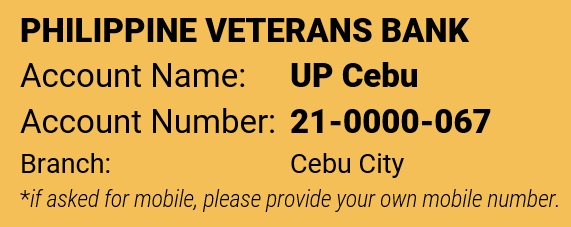
- 📌When paying via GCash, ensure that four zeroes are added at the beginning of the reference number to make it 13 digits (000021-0000-067).
-
-
 Make sure that payment status shows COMPLETED or SUCCESSFUL
- For GCash transactions, make sure to enable mobile or email notifications.
-
-
-
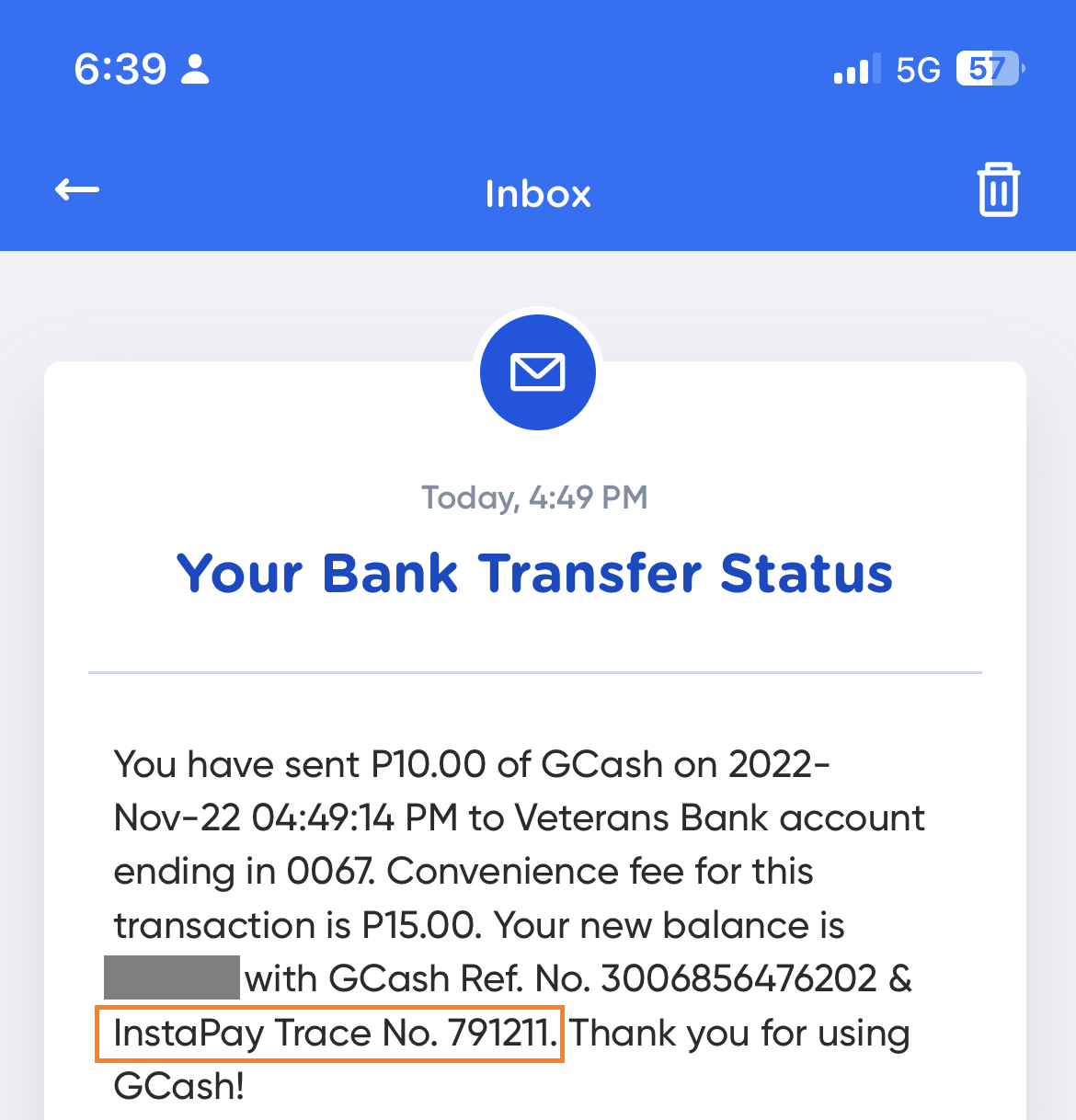
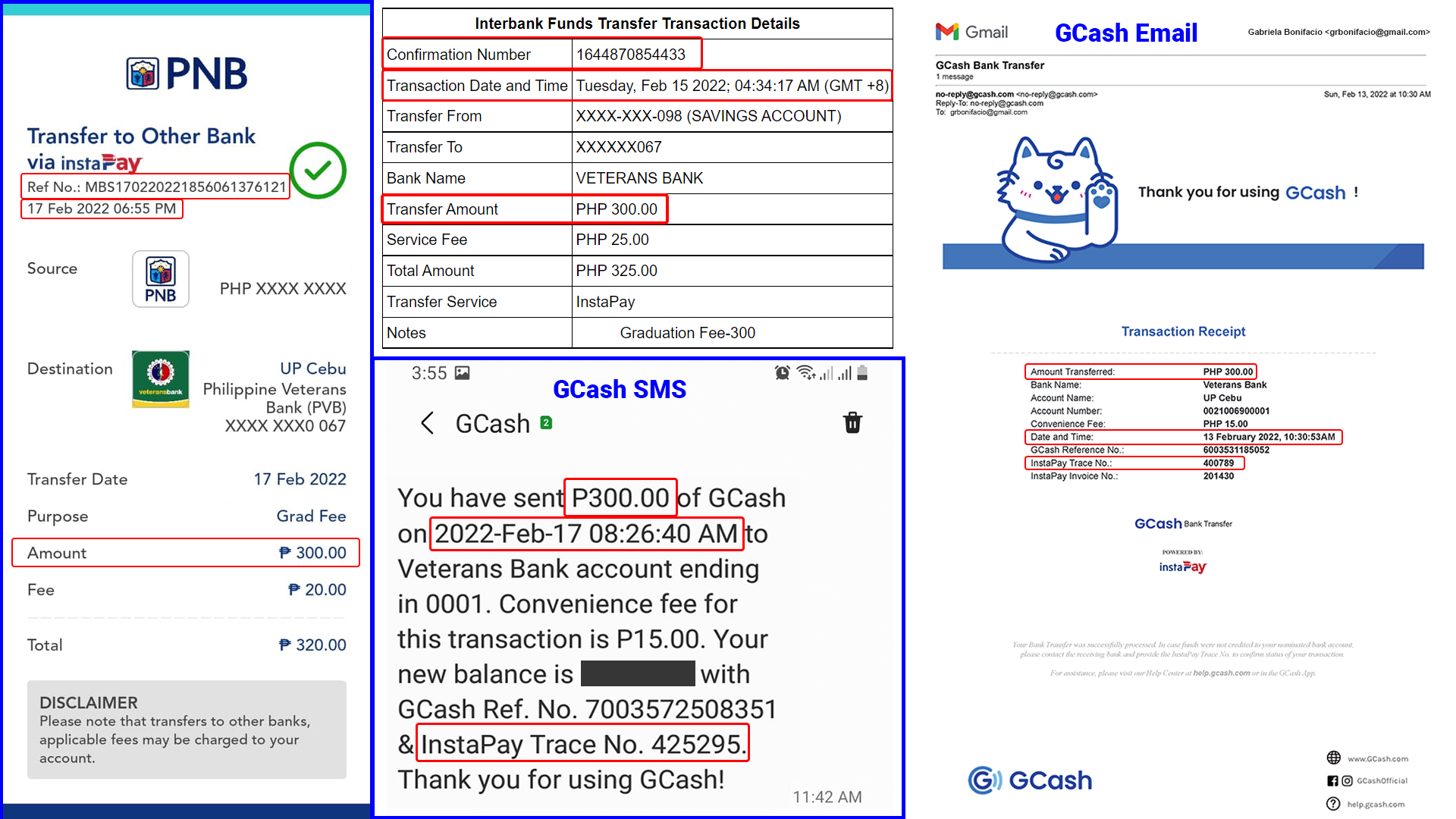
- Attach proof of completed payment from GCash SMS or GCash Email with InstaPay Trace Number (also found in your GCash Inbox, “Your Bank Transfer Status” message)
- The proof must clearly show the amount paid, transaction date, time, and reference number.
- Attach proof of completed payment from GCash SMS or GCash Email with InstaPay Trace Number (also found in your GCash Inbox, “Your Bank Transfer Status” message)
-
See samples below for correct proof of payment.
💵 Email your proof of payment to the College Secretary of your respective college for verification.
College of Communication, Art, and Design @ [email protected]
College of Science @ [email protected]
College of Social Sciences @ [email protected]
School of Management @ [email protected]
💵 Upon confirmation of payment, the College Secretary will issue your Form 5 marked “Officially Registered.”.
You are now officially registered as student of UP Cebu!
📌 Remember to activate your UP email account to receive notifications and access the learning management system and other electronic resources of UP Cebu.
📆 Important Dates To Remember
| 20 July 2026 until date of scheduled enrollment | 🏥 Medical and dental examination to obtain medical certificate from UP Cebu Clinic |
| See email from UP Cebu | 🌐 Deadline for online submission of required documents and Student Registration Form (with RFID application) |
| 22 – 24 July 2026 | 📋 Enrollment period for accepted transfer students |
| 3 – 7 August 2026 | 📝 Regular Registration Period for continuing students for the First Semester AY 2026-2027 |
| 17 – 20 August 2026 | 📝 Enrollment period for MEd students and submission of physical copies of requirements |
| 🎒 First Day of Classes ∗ University Orientation Program for First Year Students (9:00 AM – 12:00 NN, Performing Arts Hall) ∗ College Orientation for First Years (1:30 PM) |
📌 Important Reminders
-
- Keep copies of all submitted documents for your records. Documents submitted to the OUR cannot be borrowed at any time.
- The OUR will not return original copies.
- Keep your Form 5, study plan, and checklist for the duration of your studies.
📌 Need Help?
-
- OUR: [email protected]
- Clinic: [email protected]
- Dormitory: [email protected]
- Scholarship/OSA: [email protected]
You may also read Frequently Asked Questions (FAQ)
Updated 7 July 2026